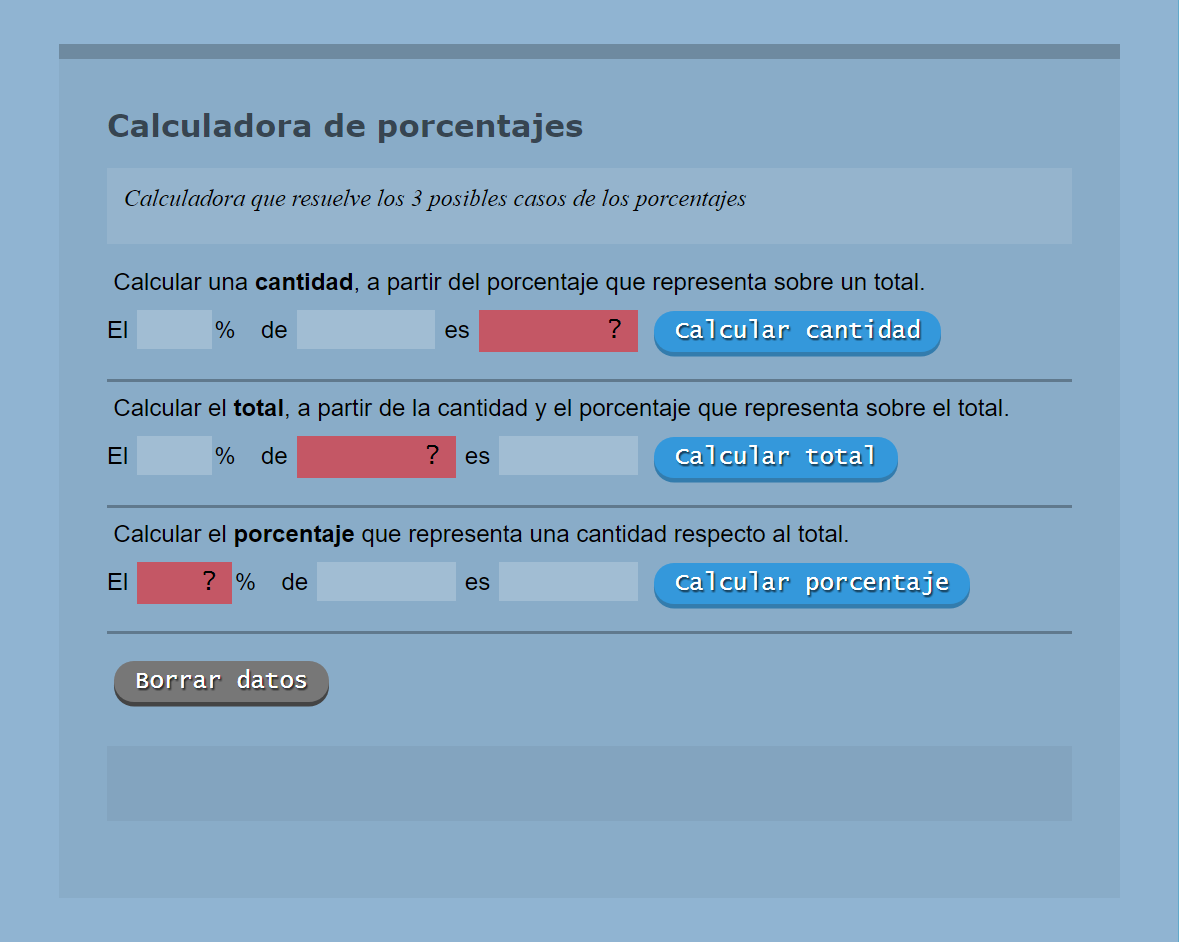
E - Porcentajes
 Este ejercicio consiste realizar una calculadora que realiza porcentajes.
Para realizar el script he utilizado: function, if...else y for....
Con el método addEventListener capturamos el evento focus de cualquier input y borramos los posibles mensajes de error de la caja #resultado.
Código JavaScript
// ========================================
//  Código JavaScript
//  CALCULADORA DE PORCENTAJES
//  (cc) 2017, 3con14.pro
// ========================================
var resultado = document.getElementById('resultado');
var datos = document.getElementsByTagName('input');
for (var i=0; i<datos.length;i++){
  datos[i].addEventListener('focus', function(){ resultado.innerHTML = ''; });
}
var boton0 = document.getElementById('boton0');
boton0.addEventListener('click', function(){ CalcularParte(0); });
var boton1 = document.getElementById('boton1');
boton1.addEventListener('click', function(){ CalcularParte(1); });
var boton2 = document.getElementById('boton2');
boton2.addEventListener('click', function(){ CalcularParte(2); });

function CalcularParte(b){
  var vtanto = document.getElementById('porcentaje'+b).value;
  var vtotal = document.getElementById('total'+b).value;
  var vparte = document.getElementById('parte'+b).value;

  var tanto  = document.getElementById('porcentaje'+b);
  var total  = document.getElementById('total'+b);
  var parte  = document.getElementById('parte'+b);

  var resultado;
  switch (b) {
    case 0:
      if (isNaN(vtanto) || isNaN(vtotal) || vtanto=='' || vtotal==''){
        document.getElementById('resultado').innerHTML = '¡¡ ERROR !!';
      } else {
        vtanto      = parseFloat(vtanto)/100;
        vtotal      = parseFloat(vtotal);
        resultado   = vtanto*vtotal;
        parte.value = resultado;
      }
      break;
    case 1:
      if (isNaN(vtanto) || isNaN(vparte) || vtanto=='' || vparte==''){
        document.getElementById('resultado').innerHTML = '¡¡ ERROR !!';
      } else {
        vtanto      = parseFloat(vtanto)/100;
        vparte      = parseFloat(vparte);
        resultado   = vparte/vtanto;
        total.value = resultado;
      }
      break;
    case 2:
      if (isNaN(vtotal) || isNaN(vparte) || vtotal=='' || vparte==''){
        document.getElementById('resultado').innerHTML = '¡¡ ERROR !!';
      } else {
        vparte      = parseFloat(vparte);
        vtotal      = parseFloat(vtotal);
        resultado   = (vparte/vtotal)*100;
        tanto.value = resultado;
      }
      break;
  }
}
Código HTML
<!DOCTYPE html>
<html lang="es">
<head>
<meta charset="UTF-8">
<meta http-equiv="X-UA-Compatible" content="IE=edge">
<meta name="viewport" content="width=device-width, initial-scale=1">
<meta name="description" content="Curso de JS">
<meta name="author" content="(cc) 3con14" />
<title>Porcentajes</title>
<link rel="stylesheet" href="/css/estilos.css">
</head>
<body>
<div class="contenedor">
<div id="titulo">Calculadora de porcentajes</div>
<div id="info">
<p>Calculadora que resuelve los 3 posibles casos de los porcentajes</p>
</div>
<label for="dato">Calcular una <strong>cantidad</strong>, a partir del porcentaje que representa sobre un total.</label><br>
El <input type="text" id="porcentaje0" size="4" class="dcha" onfocus="this.select();" tabindex="1">%   de
<input type="text" id="total0" size="8" class="dcha" onfocus="this.select();" tabindex="2"> es
<input type="text" id="parte0" size="8" class="dcha r" readonly="false" value="?">
<button id="boton0" class="boton azul" tabindex="3">Calcular cantidad</button>
<hr>
<label for="dato">Calcular el <strong>total</strong>, a partir de la cantidad y el porcentaje que representa sobre el total.</label><br>
El <input type="text" id="porcentaje1" size="4" class="dcha" onfocus="this.select();" tabindex="4">%   de
<input type="text" id="total1" size="8" class="dcha r" readonly="false" value="?"> es
<input type="text" id="parte1" size="8" class="dcha" onfocus="this.select();" tabindex="5" >
<button id="boton1" class="boton azul" tabindex="6">Calcular total</button>
<hr>
<label for="dato">Calcular el <strong>porcentaje</strong> que representa una cantidad respecto al total.</label><br>
El <input type="text" id="porcentaje2" size="4" class="dcha r" readonly="false" value="?">%   de
<input type="text" id="total2" size="8" class="dcha" onfocus="this.select();" tabindex="7"> es
<input type="text" id="parte2" size="8" class="dcha" onfocus="this.select();" tabindex="8" >
<button id="boton2" class="boton azul" tabindex="9">Calcular porcentaje</button>
<hr>
<button onclick="window.location.reload();" class='boton gris'>Borrar datos</button>
<div id="resultado"></div>
</div>
<script src="/js/codigo.js"></script>
</body>
</html>
Reglas CSS
/*  ========================================
//  Hoja de estilos CSS
//  CALCULADORA DE PORCENTAJES
//  (cc) 2017, 3con14.pro
============================================ */

* {
  margin     : 0;
  padding    : 0;
  box-sizing : border-box;
  transition : all 0.25s ease-in;
}
:focus { outline: 0 none transparent; }
body {
  min-height       : 100vh;
  font             : 16px/1.2 sans-serif;
  display          : flex;
  background-color : rgba(70, 130, 180, 0.6);
}
h1,h2,h3,h4,h5,h6,p { padding: 0.2rem; }
hr {
  border: 0;
  margin: 0.5em 0;
  height: 2px;
  background-color: rgba(0, 0, 0, 0.3);
}
ol, ul { margin: 0.5em 0 0.5em 35px; }
.txt-S  { font-size:  80%; }
.txt-M  { font-size:  90%; }
.txt-L  { font-size: 110%; }
.dcha   { text-align: right; }
.centro { text-align: center; }

.contenedor {
  max-width        : 800px;
  width            : 90%;
  min-height       : 90vh;
  margin           : auto;
  padding          : 2rem;
  border-top       : 10px solid rgba(0, 0,0, 0.2);
  background-color : rgba(0, 0, 0, 0.05);
}
label, input {
  margin  : 0.5rem 0.1rem 0.5rem 0.1rem;
  padding : 0.3rem 0.2rem 0.2rem 0.2rem;
  border  : 0;
}
input {
  background-color : rgba(255,255,255,0.2);
  font             : 1.1em "Lucida Console", "Courier New", monospace;
}
.inp-txt {
  border      : 1px solid #fff;
  font        : 1.1em "Lucida Console", "Courier New", monospace;
  box-shadow  : 0.5px 0.5px 3px 0 rgba(112, 112, 112, 0.8) inset;
}
.inp-chk {
  width          : 1.2rem;
  height         : 1.2rem;
  vertical-align : middle;
  display        : inline-block;
}
#info, #resultado {
  min-height : 8vh;
  margin     : 1em 0;
  padding    : 0.5em;
  overflow   : auto;
}
textarea {
  max-width  : 100vw;
  width      : 96%;
  min-height : 10vh;
  display    : block;
  border     : 0;
  overflow   : auto;
  padding    : 1em;
  margin     : 0.5em;
  border     : thin solid #fff;
  box-shadow : 1px 1px 4px 1px rgba(0, 0, 0, 0.3) inset;
}
#titulo {
  font : 900 1.3em/1.2 verdana,sans-serif;
  color: rgba(0, 0, 0, 0.6);
}
#info {
  font             : italic 1em/1.1 serif;
  background-color : rgba(255, 255, 255, 0.1);
  overflow         : auto;
}
#resultado {
  background-color : rgba(0, 0, 0, 0.05);
  font             : 100 1.2em/1.2 "Lucida Console", "Courier New", monospace;
}
.r { background-color: rgba(255, 0, 0, 0.5); }
.v { background-color: rgba(0,255, 0, 0.5); }
.a { background-color: rgba(0, 0, 255, 0.5); }
.r, .v, .a { color: #000; padding: 5px 10px; }

/* BOTONES */
 button {
  margin    : 0.5em 0.25em;
  padding   : 0.25em 0.5em;
  cursor    : pointer;
  font-size : 1em;
  border    : 0;
 }
.boton {
  text-align    : center; text-decoration : none;
  font-family   : "Lucida Console", "Courier New", monospace;
  display       : inline-block; position : relative;
  background    : #777; color : #FFF;
  text-shadow   : 1px 1px 1px rgba(0, 0, 0, 0.7);
  padding       : 5px 13px; margin : 10px 5px;
  border-radius : 100px; white-space : nowrap;
  border        : 1px solid transparent;
  transition    : all 0.1s ease-in-out;
  border        : 1px solid transparent;
}
.gris         { background: #777; box-shadow: 0px 3px 0 0 #444; }
.gris:hover   { background: hsla(0, 0%, 57%, 1); }
.rojo         { background: #E74C3C; box-shadow: 0px 3px 0 0 hsla(6, 63%, 36%, 1); }
.rojo:hover   { background: hsla(5, 100%, 70%, 1); }
.verde        { background: #2ECC71; box-shadow: 0px 3px 0 0 hsla(145, 63%, 32%, 1); }
.verde:hover  { background: hsla(145, 70%, 60%, 1); }
.azul         { background: #3498DB; box-shadow: 0px 3px 0 0 hsla(204, 54%, 44%, 1); }
.azul:hover   { background: hsla(204, 77%, 60%, 1); }
.rojo:active, .verde:active, .azul:active, .gris:active { transform: translateY(4px); }
.rojo:hover, .verde:hover, .azul:hover, .gris:hover     { border: 1px solid rgba(255, 255, 255, 0.4); }